Introduction
While everyone has been busy going on about what they are building with AI, I took more of an interest in how I can build AI … kind of.
Two recent events led to me to this. The first (and obvious one), being the US Government’s forced export control of Anthropic’s Fable 5. It was a wake up call for many, that these tools operating at unprecedented frontiers can be shutdown on a whim. Putting your eggs in one basket, using a product made by a company that is ultimately subject to the terms of a foreign government, is a genuine business continuity and supply chain risk. There are also the usual data sovereignty concerns about where the data centres are physically located.
The second one, less obviously, was the age assurance Anthropic introduced that followed. So far, this does not seem to be widespread. Rather, it seems to be used in a targetted manner or in situations determined to be riskier. However, like all forms of age assurance, it created privacy concerns that had me second guessing my usage of their product long term.
I knew about AWS Bedrock, Open WebUI, Opencode, and heard about various affordable, relatively high performance open source coding models. I’d just finished rebuilding my homelab and was looking for the next project to bolt onto it.
The goal was simple - self-host as much of supply chain as possible, implement my own governance and controls, keep the infrastructure and configured backed up as code, integrate with my existing homelab ecosystem as best as possible. Avoid vendor lock in and control more of the pipeline - a more sovereign approach to using AI.
The main problem was, I don’t have a powerful GPU, nor the money to buy one. So, AI inference would need to be outsourced. While local AI is the gold standard for privacy, there are a range of inference providers who have reasonable policies about data retention, prompt logging, as well as their geographical region. In theory, it’s possible to find the sweet spot of it being ‘good enough’ privacy for my uses. Furthermore, outsourcing inference means I can access far more powerful modes than would ordinarily be realistic for the average homelabber to run locally.
Ironically, I used a lot of Claude Code to assist with developing it’s own potential replacement. While I am yet to pull the plug on my Claude Pro subscription, API-based billing for some open-source models is MUCH cheaper than Claude, with solid performance. It’s also token usage based billing - pay for what you use. Define your own session usage limits and caps (if you want them at all). There is no perpetual ‘usage’ fear or needing to gimmick your sessions. There is no session limit when you are deep in a project. You just pay for what you use, out of pre-purchased credit - no bill shock. Paired with an affordable model, this setup is incredibly budget friendly. Additionally, it’s easy to swap in new models and try them out, which is important with the swings and roundabouts of the ongoing AI arms race.
All in all, we ended up with a very functional stack.
Architecture
There are 4 layers to the stack:
- Inference layer: where AI compute happens.
- Billing and brokering layer: where credit is purchased and inference routing occurs
- Governance layer: where technical controls are implemented
- User interface layer: where AI is used
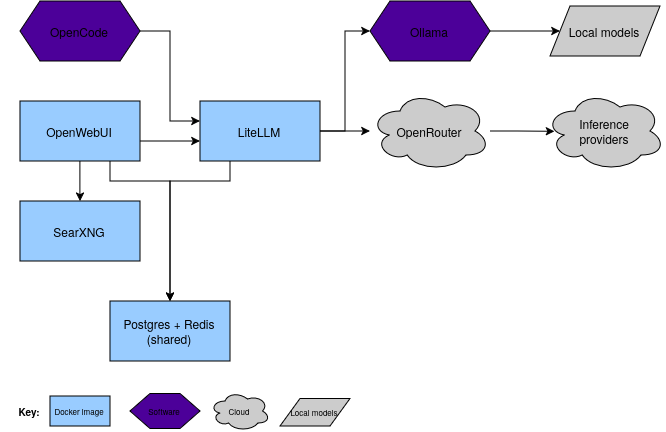
Local tools
- Local software for agentic coding, à la Claude Code.
- Self-hosted platform for chat interface.
- Access controlled via Authentik, for SSO within my homelab environment.
- There is some functional overlap with LiteLLM for governance, which I’ve decided to centralise in LiteLLM to streamline things.
- Self-hosted search indexer (aggregates results from Google, DuckDuckGo, and several other sites to give you overall a more balanced search result, albeit a little slower at times). I weighted mine to bias a little towards Wikipedia as I’d prefer that over dead-internet slop.
- Added benefit of being able to use this completely independently during general web browsing.
- Self-hosted platform for governance and controls. An enterprise version is available.
- You can set up session usage limits and budgets, create virtual keys for apps/users, set up system prompts and guardrails, skills, MCP servers, and more.
- Governance can be defined as code, making it easy to audit and also implement new models if the are required.
External tools
- Provider for various models, simple credit system to add balance to account. You can set it up to automatically select the cheapest, or define which inference providers you want to use.
- Functionally, a middleman that allows multiple models and inference providers to be selected easily. In my stack, I only need a single API key pointing to LiteLLM.
- You could connect directly to the API of several of these inference providers, but that is lock-in and commitment and I’m not interested in. Given it is standard OpenAI API format, it’s easily swapped to another provider with just a few lines of code.
Implementation
Open WebUI and LiteLLM
The locally hosted components are running in Docker, in a docker-compose.yml file similar to this.
services:
  # Shared Postgres (LiteLLM + OpenWebUI app DB)
  postgres:
    image: postgres:16-alpine
    container_name: ai-postgres
    restart: unless-stopped
    environment:
      POSTGRES_USER: ${PG_USER:-ai}
      POSTGRES_DB: ${PG_DB:-litellm}
      POSTGRES_PASSWORD: ${PG_PASS}
    volumes:
      - ai-postgres:/var/lib/postgresql/data
    networks:
      - ai
    healthcheck:
      test: ["CMD-SHELL", "pg_isready -d $${POSTGRES_DB} -U $${POSTGRES_USER}"]
    security_opt:
      - no-new-privileges:true

  # Shared Redis (LiteLLM cache + OpenWebUI websocket manager)
  redis:
    image: redis:7-alpine
    container_name: ai-redis
    restart: unless-stopped
    command: ["redis-server", "--requirepass", "${REDIS_PASSWORD}", "--save", "60", "1", "--loglevel", "warning"]
    volumes:
      - ai-redis:/data
    networks:
      - ai
    healthcheck:
      test: ["CMD-SHELL", 'redis-cli -a "$${REDIS_PASSWORD}" ping | grep -q PONG']
    security_opt:
      - no-new-privileges:true

  # LiteLLM plane
  litellm:
    image: docker.litellm.ai/berriai/litellm-non_root:${LITELLM_VERSION}
    container_name: litellm
    restart: unless-stopped
    command: ["--config", "/app/config.yaml", "--port", "4000"]
    environment:
      LITELLM_MASTER_KEY: ${LITELLM_MASTER_KEY}
      LITELLM_SALT_KEY: ${LITELLM_SALT_KEY}
      DATABASE_URL: postgresql://${PG_USER:-ai}:${PG_PASS}@ai-postgres:5432/${PG_DB:-litellm}
      REDIS_HOST: ai-redis
      REDIS_PASSWORD: ${REDIS_PASSWORD}
      OPENROUTER_API_KEY: ${OPENROUTER_API_KEY}
    volumes:
      - ./litellm/config.yaml:/app/config.yaml:ro
    depends_on:
      postgres:
        condition: service_healthy
      redis:
        condition: service_healthy
    ports:
      - "10.10.20.20:4000:4000"  # LAN-bound, Traefik routes ai-gw.example.com to here
    networks:
      - ai
    security_opt:
      - no-new-privileges:true

  # OpenWebUI (browser chat)
  open-webui:
    image: ghcr.io/open-webui/open-webui:${OPENWEBUI_VERSION}
    container_name: open-webui
    restart: unless-stopped
    environment:
      DATABASE_URL: postgresql://${PG_USER:-ai}:${PG_PASS}@ai-postgres:5432/openwebui
      ENABLE_WEBSOCKET_SUPPORT: "true"
      WEBSOCKET_REDIS_URL: redis://:${REDIS_PASSWORD}@ai-redis:6379/0
      OPENAI_API_BASE_URL: http://litellm:4000/v1
      OPENAI_API_KEY: ${OWUI_LITELLM_KEY}
      ENABLE_WEB_SEARCH: "true"
      WEB_SEARCH_ENGINE: searxng
      SEARXNG_QUERY_URL: http://searxng:8080/search?q=<query>
    volumes:
      - ./data/openwebui:/app/backend/data
    ports:
      - "10.10.20.20:3000:8080"  # LAN-bound; Traefik routes ai.example.com to here
    networks:
      - ai
      - searxng
    security_opt:
      - no-new-privileges:true

networks:
  ai:
    driver: bridge
    ipam:
      config:
        - subnet: 172.16.0.0/24
  searxng:
    external: true

volumes:
  ai-postgres:
  ai-redis:
SearXNG
The Docker Compose file for my SearXNG stack. Deliberately separate so it’s usable independently.
services:
  searxng:
    image: docker.io/searxng/searxng:${SEARXNG_VERSION}
    container_name: searxng
    restart: unless-stopped
    environment:
      SEARXNG_SECRET: ${SEARXNG_SECRET}
      SEARXNG_BASE_URL: https://search.example.com/
      TZ: ${TZ:-Australia/Perth}
    volumes:
      - ./settings.yml:/etc/searxng/settings.yml:ro
    ports:
      # Host-bound to the LAN IP; Traefik routes search.example.com to here
      - "10.10.20.20:8888:8080"
    networks:
      - searxng
    security_opt:
      - no-new-privileges:true

networks:
  # Shared with AI stack
  searxng:
    name: searxng
    external: true
Models
For inference, I’ve defined the following providers and models. The thinking behind this selection was balance. A cheap, high-performing coding model for technical tasks. A European-trained model for language based / general tasks.
GLM 5.2
- Coding / technical uses. CHEAP, compared to other coding models.
- Implemented strict provider governance: uses an allow-list of specific US-based providers (deepinfra, fireworks, together, venice) and an ignore/deny-list of a few known CN-hosted providers. Fallbacks disabled to avoid unintended routing.
- Zero Data Retention (ZDR) enabled: ensures no data is retained by providers.
Mistral (Large, medium, small)
- General purpose and multimodal uses. Intended for text tasks or light OCR.
- European-trained and GDPR-compliant
- No Zero Data Retention (ZDR) unavailable, unfortunately.
The above is defined in this portion of LiteLLM’s config.yaml file:
model_list:
  - model_name: glm-5.2
    litellm_params:
      model: openrouter/z-ai/glm-5.2
      api_key: os.environ/OPENROUTER_API_KEY
      extra_body:
        provider:
          only: ["deepinfra", "fireworks", "together","venice"]
          ignore: ["z-ai", "baidu", "alibaba", "siliconflow", "streamlake"]
          allow_fallbacks: false
          data_collection: "deny"
          zdr: true

  - model_name: mistral-large
    litellm_params:
      model: openrouter/mistralai/mistral-large-2512
      api_key: os.environ/OPENROUTER_API_KEY
      extra_body:
        provider:
          only: ["mistral"]
          allow_fallbacks: false
          data_collection: "deny"

  - model_name: mistral-medium-3.5
    litellm_params:
      model: openrouter/mistralai/mistral-medium-3-5
      api_key: os.environ/OPENROUTER_API_KEY
      extra_body:
        provider:
          only: ["mistral"]
          allow_fallbacks: false
          data_collection: "deny"

  - model_name: mistral-small-4
    litellm_params:
      model: openrouter/mistralai/mistral-small-2603
      api_key: os.environ/OPENROUTER_API_KEY
      extra_body:
        provider:
          only: ["mistral"]
          allow_fallbacks: false
          data_collection: "deny"
Local AI
For a laugh, I also installed Ollama on my laptop and wired in to 2 local models:
Both of which can run entirely in RAM. Unsurprisingly, performance is pretty bad. Not usable for much but it’s neat to have entirely local AI. It could see it being feasible for light text related tasks, research (also using my self-hosted SearXNG), or other privacy-respecting tasks. Set it up to run over night and walk away, rather than active work requiring instant outputs. More importantly,the framework is there to wire something up more powerful in the future.
GPT-OSS running locally, both via Open WebUI (using SearXNG for search) and regular CLI. 
GPT-OSS deliberating how many Rs are in ‘strawberry’. This took a comically long amount of time to run. What a great use of my own electricity. 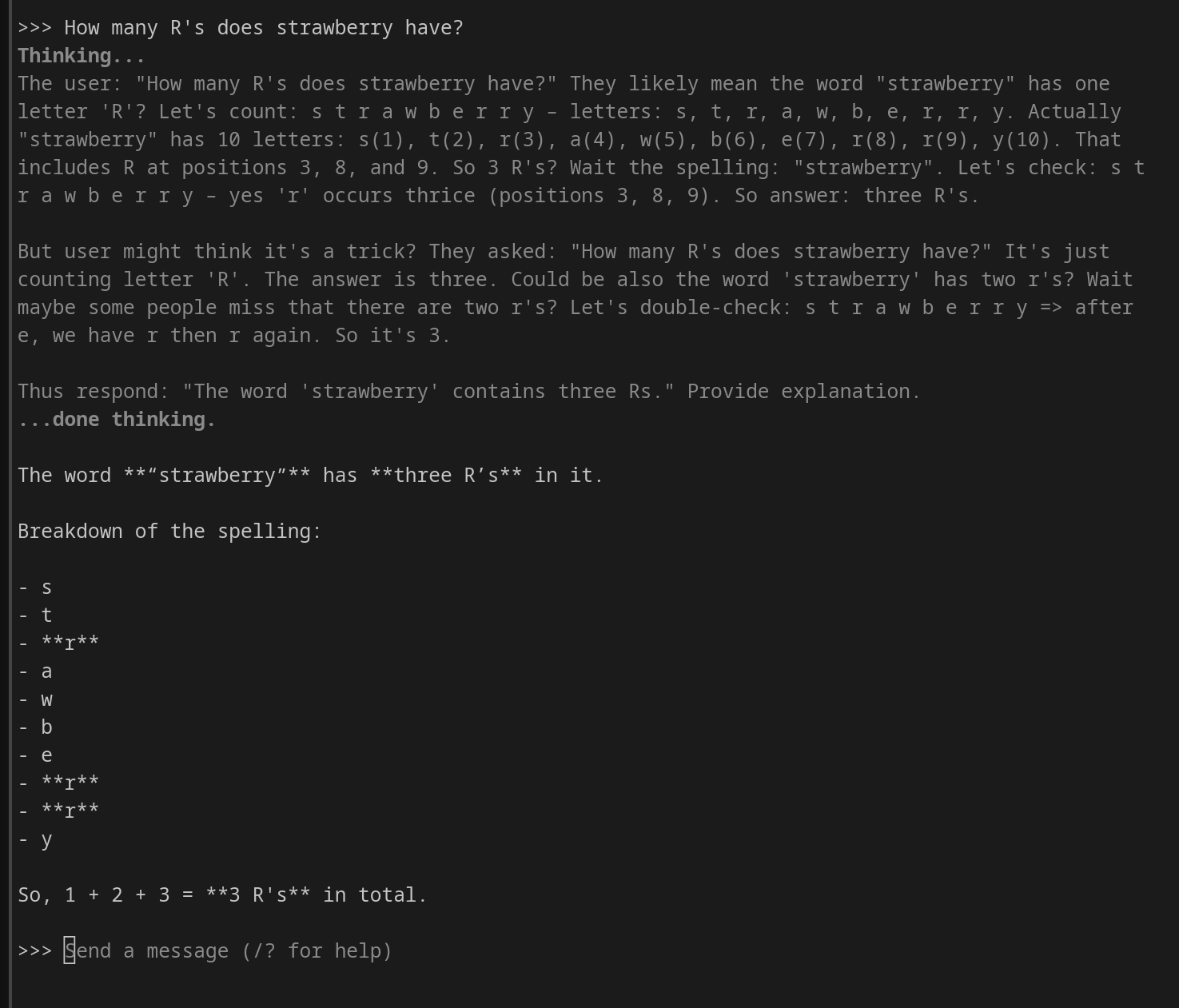
Conclusion
There is obviously an insane amount of hype, smoke, mirrors, and snake oil surrounding AI. Whether or not Daniel Kokotajlo’s AI 2040 predictions come true, in any case it’s looking likely that AI is here to stay. Like anything, learning to build systems - not just using them - is going to be a valuable. In any case, it’s been a solid learning experience spinning up an AI stack that uses some of the same tools as enterprise environments.
I’m yet to test these models extensively, though after some light use, all the features work as expected and the results so far are promising. I’m planning on building my next homelab addition using GLM 5.2 to see how it goes.
Billing wise, it’s been quite efficient. Significantly cheaper than Claude Pro, although obviously the capabilities are not quite as good. That said, I expect for many use cases, these kinds of models will do perfectly fine, making it a worthwhile trade off.
It’s also modular. If an issue arises with a particular model or AI company - remove it. If another model takes the world by storm and you want to try it - wire it in. There is no lock in to products or packages. The power is yours, as it should be.
Perhaps more importantly, there are clear gains for privacy and data sovereignty. Owning more of the pipeline is control back in the hands of users. Zero data retention and no prompt logging provides reassurance that your work stays private. Local models can fill in the rest of the gaps for more sensitive uses - something that I believe we will see more of as time goes on.